When the cloud host BIOS mode is UEFI mode and the cloud host is created with this mirror and then enters the UEFI shell, what can I do to prevent the operating system from entering? The problem phenomenon is shown in Figure 1
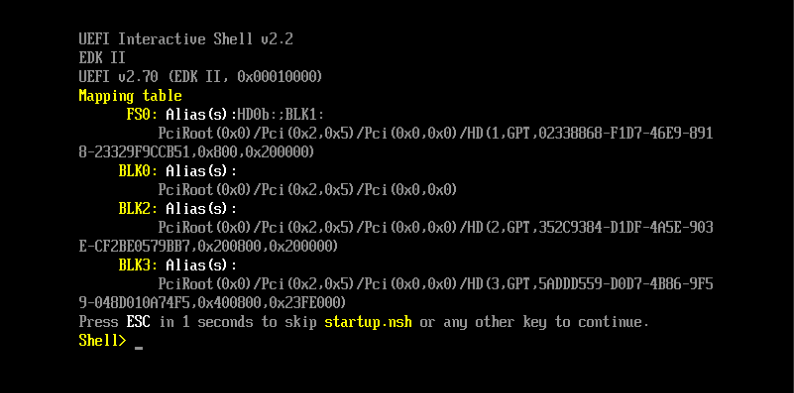
(Figure 1 UEFI Shell interface)
Cloud Platform Environment: ZStack Enterprise Version 3.10.1
Network Environment: Flat Network
Main Storage Environment: ZStack Enterprise Version Hyper-Fused Storage
Mirror Server Environment: Mirror Warehouse
Cloud host BIOS mode: UEFI
Cloud host operating system: CentOS 7.4
After using ISO to select UEFI mode to install the system, there is no correct mirroring encapsulation. After restart, it enters the UEFI shell interface. When mirroring encapsulation, you need to add scripts to skip the UEFI shell interface and enter the system directly.
1. Enter in the UEFI Shell interface
Shell> Fs0:
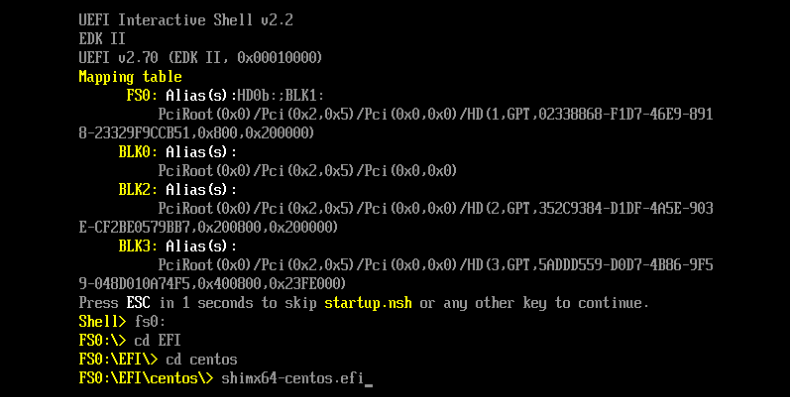
(Figure 2 exits UEFI Shell manually)
Start succeeded, but after restart, enter the UEFI shell interface again, add script to skip the UEFI shell interface and enter the system directly.
2. Add script automatically skips UEFI Shell
Edit script/boot/efi/startup. NSH
FS0:
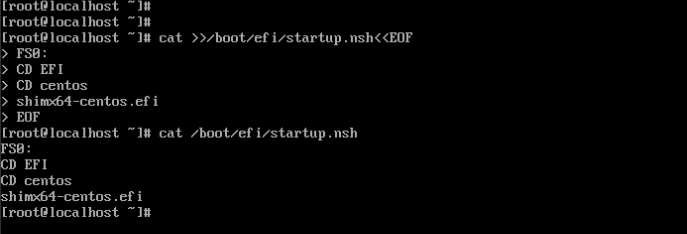
(Figure 3 adds Skip UEFI Shell script)
3. Restart again Skip UEFI Shell Start Successfully
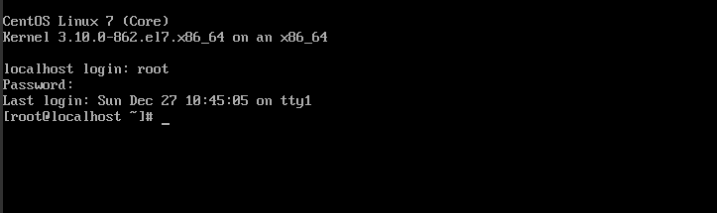
(Figure 4 Cloud Host Restart Direct Entry System)








 沪公网安备 31011202014879号